Manual Control
The Manual Control feature allows an operator to directly pilot the aircraft using a supported control device. It also provides access to camera controls, live video feeds, and camera operation tools during flight.
Enabling Manual Control
To begin manual flight:
-
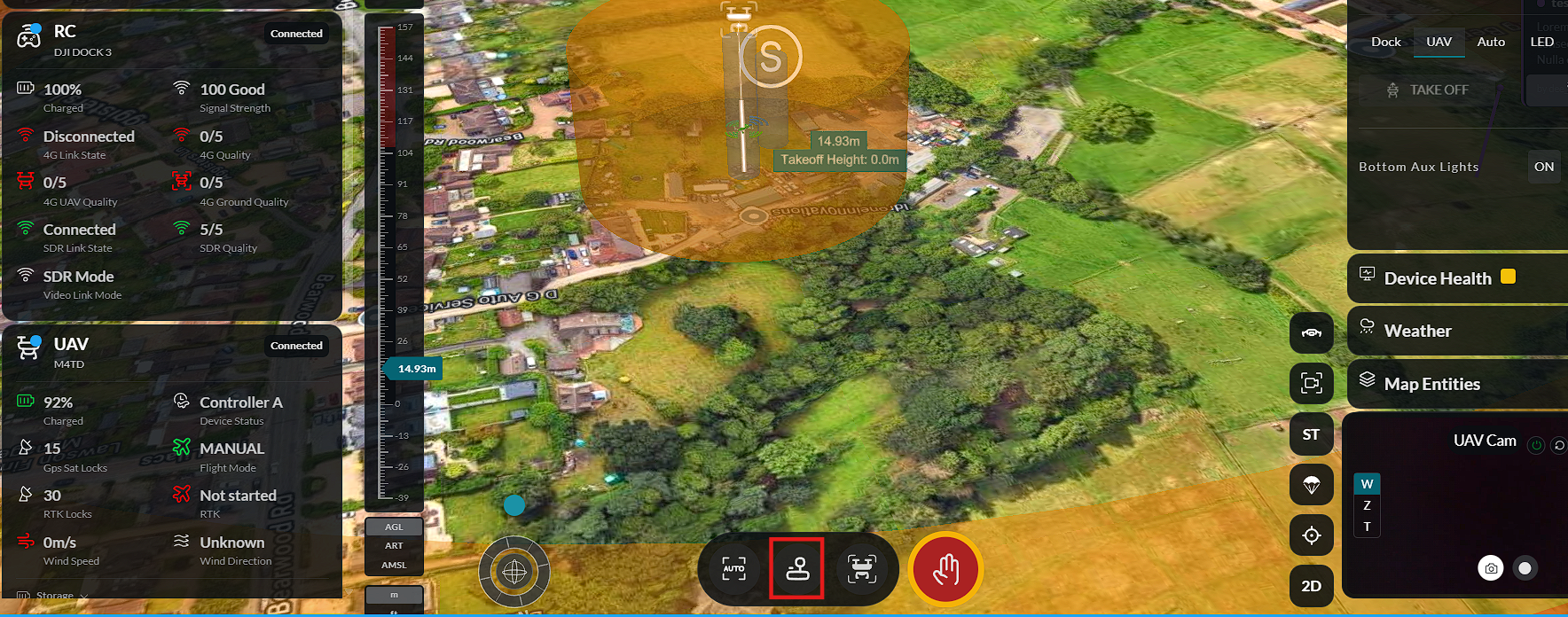
Select Manual Mode.
-
Click Manual Control.
-
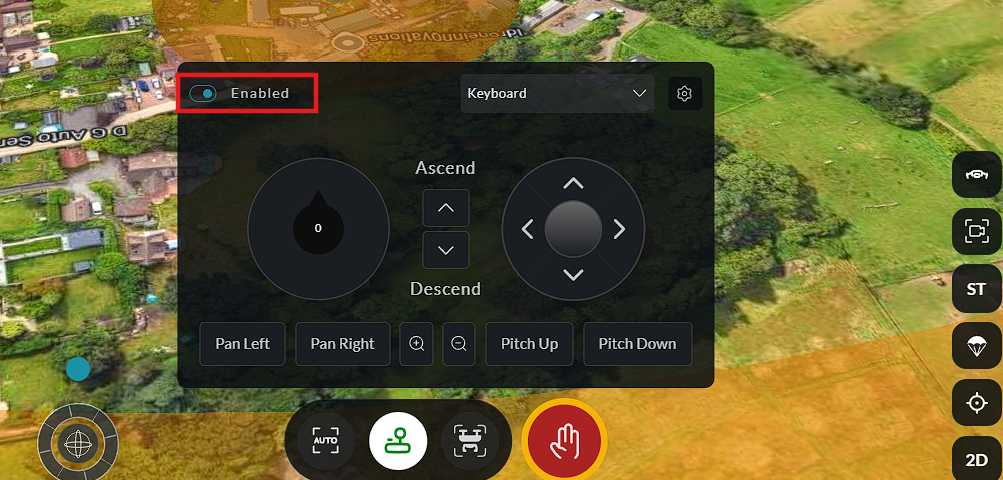
Enable Manual Mode.
-
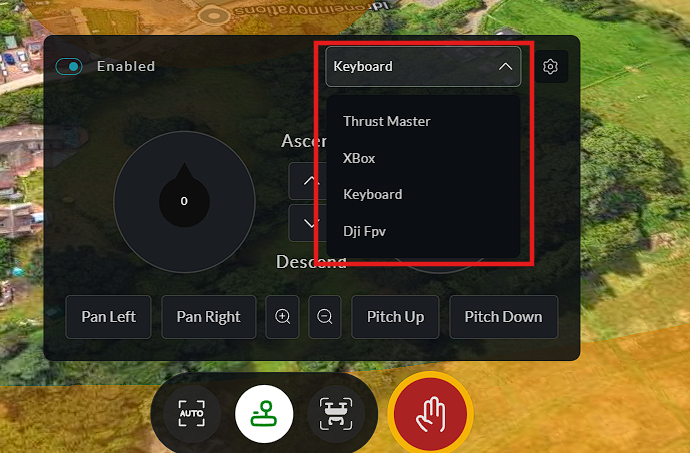
Select the preferred Controller Type.
-
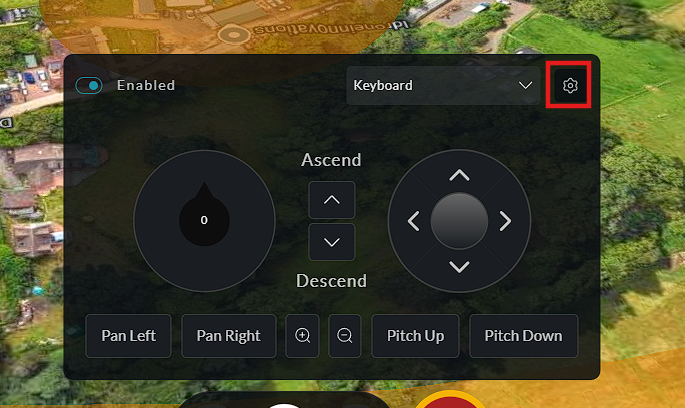
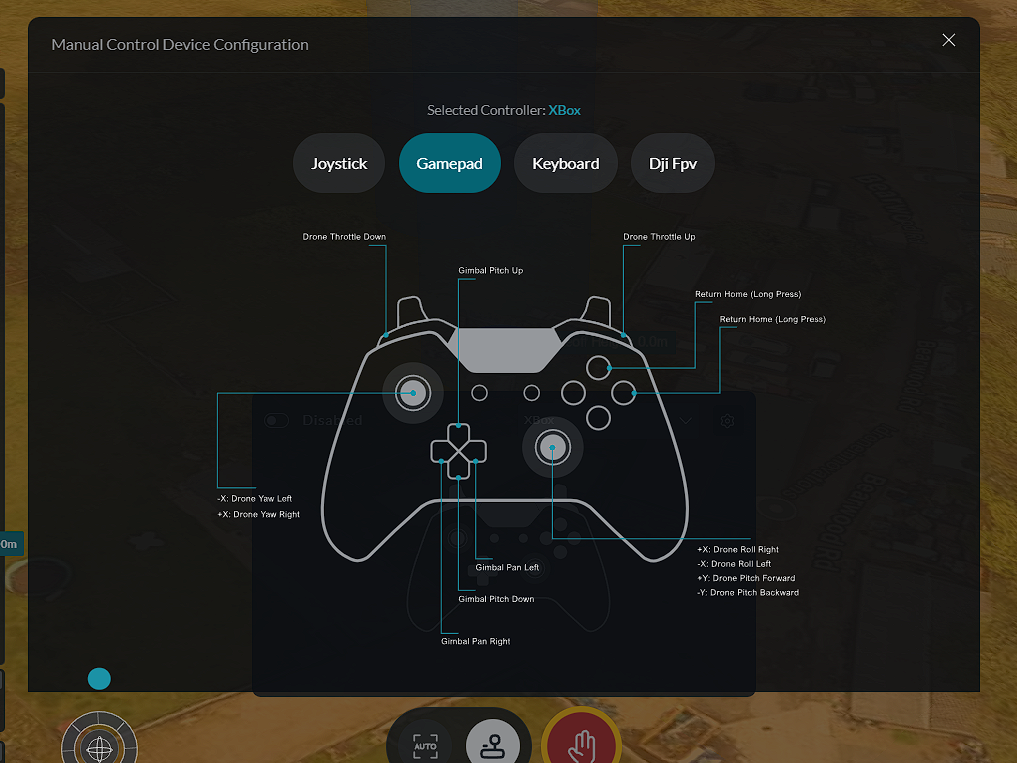
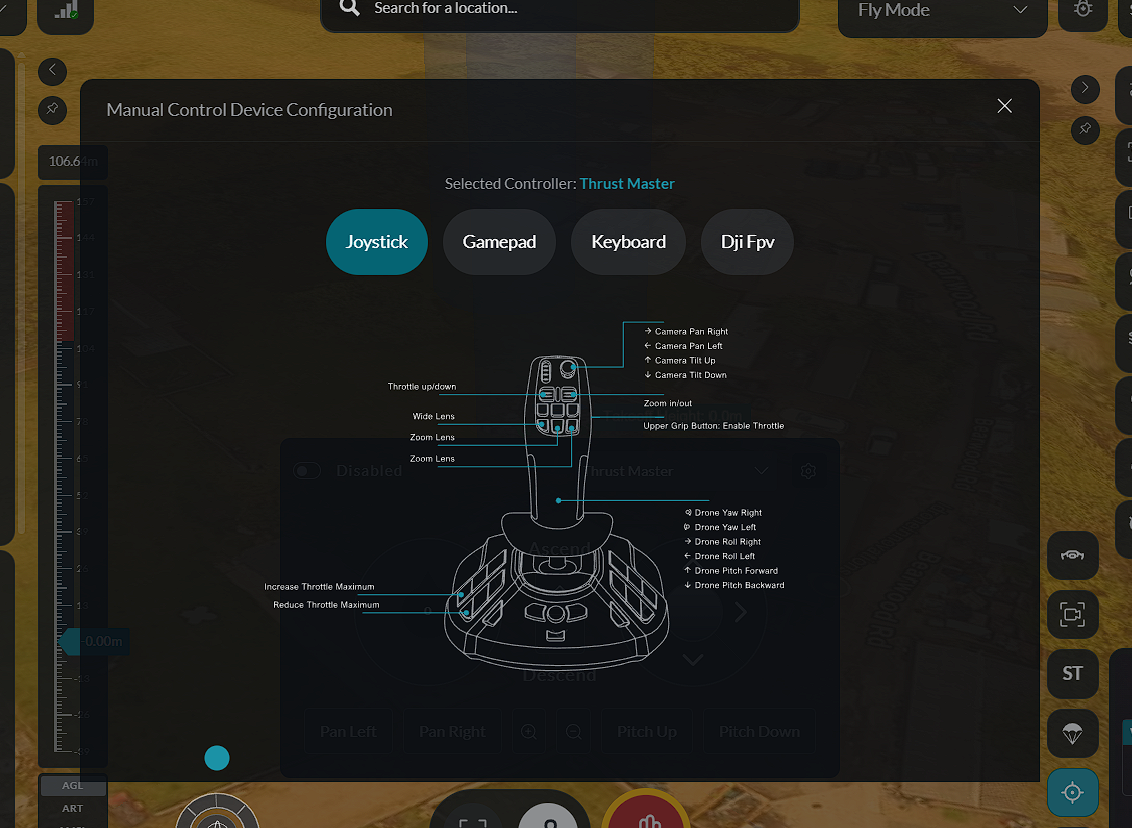
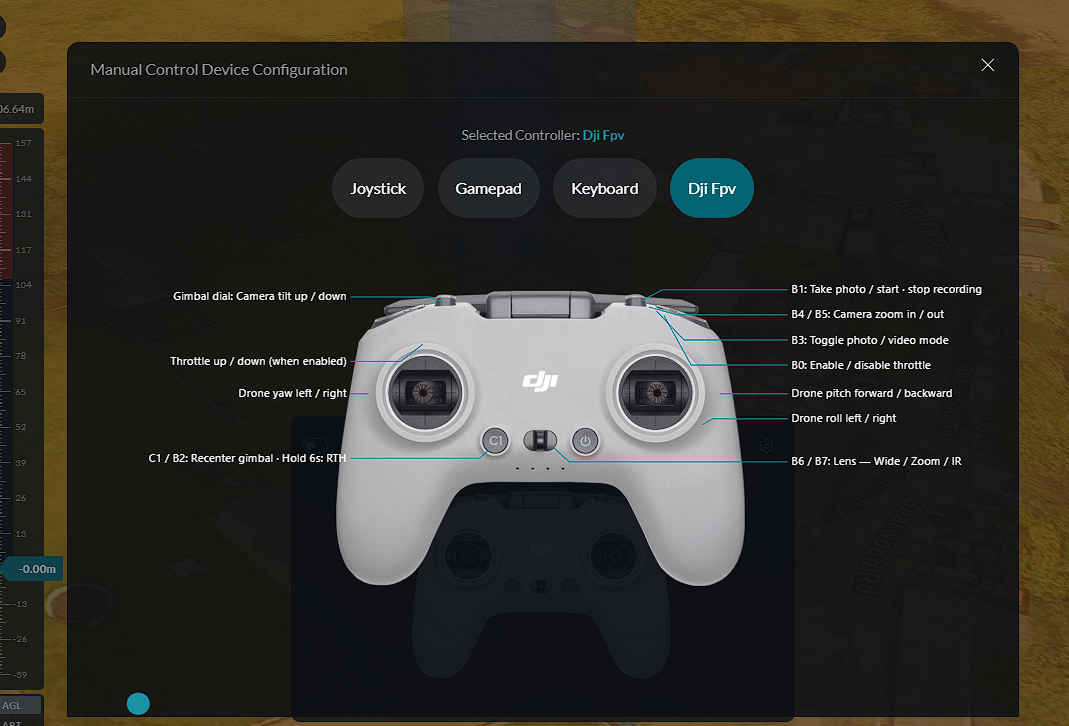
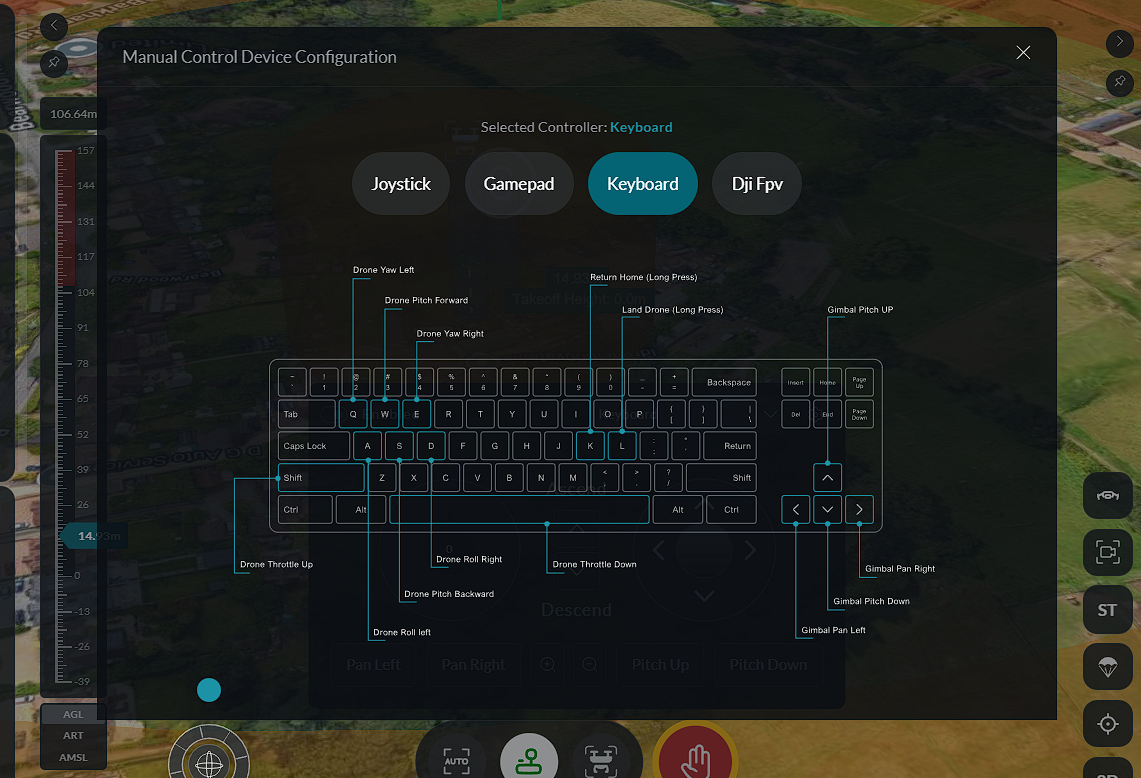
Click the Settings (gear) icon to view the controller key mappings or button assignments for the selected controller.
Available controller types include Gamepad, Joystick, DJI FPV, and Keyboard.
Gamepad:
Joystick:
DJI FPV Controller:
Keyboard:
Manual Flight with Virtual Stick
Manual Control uses Virtual Stick to fly the aircraft from your computer using a keyboard or a physical game controller, without needing a physical DJI remote. It is useful for inspections, repositioning, and test flights.
When enabled, the dashboard sends continuous velocity commands to the aircraft over MQTT using the DJI MSDK virtual stick API. The drone responds as if being flown by a real remote controller, subject to the speed and altitude limits set on the device.
Virtual Stick requires a stable, low-latency connection. Do not use it in high-latency network conditions. Ensure a failsafe action is configured before enabling it so the drone can recover if the connection drops mid-flight.
Supported input devices
| Controller | How it connects |
|---|---|
| Keyboard | No hardware needed — uses your computer keyboard |
| Gamepad (Xbox) | Xbox One or Series X/S via USB or Bluetooth |
| Joystick (ThrustMaster) | ThrustMaster T.16000M joystick via USB |
| DJI FPV | DJI FPV Remote Controller via USB |
Physical controllers are auto-detected when plugged in. The dashboard reads the gamepad ID from the browser and selects the correct input mapping automatically. If a connected gamepad is not recognised, select the controller type manually from the dropdown.
Gamepad auto-detection requires a browser that supports the Gamepad API (Chrome and Edge are recommended).
Enabling and disabling
- Ensure the drone is airborne and connected.
- Open the Virtual Stick / Controller panel from the sidebar or control bar.
- Select your input device from the controller dropdown if it was not auto-detected.
- Toggle Manual Mode on. The drone is now under your manual control.
To disable, toggle Manual Mode off. The drone transitions back to hover mode. If you triggered it from an E-Stop action (Take Manual Control), disabling it returns command authority to the dashboard.
Keyboard control is disabled automatically while an active waypoint mission is running — the mission takes priority.
Keyboard controls
When Keyboard is selected, the following keys are active whenever Manual Control is enabled:
Flight:
| Key | Action |
|---|---|
W | Fly forward (pitch forward) |
S | Fly backward (pitch backward) |
A | Fly left (roll left) |
D | Fly right (roll right) |
Q | Rotate left (yaw counter-clockwise) |
E | Rotate right (yaw clockwise) |
Shift | Increase altitude (throttle up) |
Space | Decrease altitude (throttle down) |
Gimbal:
| Key | Action |
|---|---|
Arrow Up | Tilt gimbal up |
Arrow Down | Tilt gimbal down |
Arrow Left | Pan gimbal left |
Arrow Right | Pan gimbal right |
Hold K for at least 0.5 seconds to return to dock, or L to land at the current position. Releasing the key early cancels the command.
DJI FPV controller quick reference
The DJI FPV controller supports dual-mode operation — switch between flight and gimbal control on the fly with B7.
| Button | Function |
|---|---|
| B1 | Capture — take photo or start/stop recording |
| B2 | Short press: reset gimbal / Hold 6s: Return to Home (cannot be cancelled) |
| B3 | Toggle photo / video mode |
| B4 + B5 | Lens select — none/WIDE, B4/ZOOM, B5/IR |
| B7 | Mode toggle — released: Flight, pressed: Gimbal |
In Flight mode Axis 2 = throttle and Axis 3 = yaw. In Gimbal mode Axis 2 = gimbal pitch and Axis 3 = gimbal yaw, with throttle and yaw automatically zeroed to prevent unintended movement.
Roll and pitch remain active in Gimbal mode. Keep hands off Roll/Pitch while adjusting the camera, and always confirm the active mode before touching the sticks.
The controller definition screen displays all available flight controls and their corresponding keyboard keys or controller buttons.